Bandage Mystery Face AI Photo Editing Prompts | Viral Dark Look
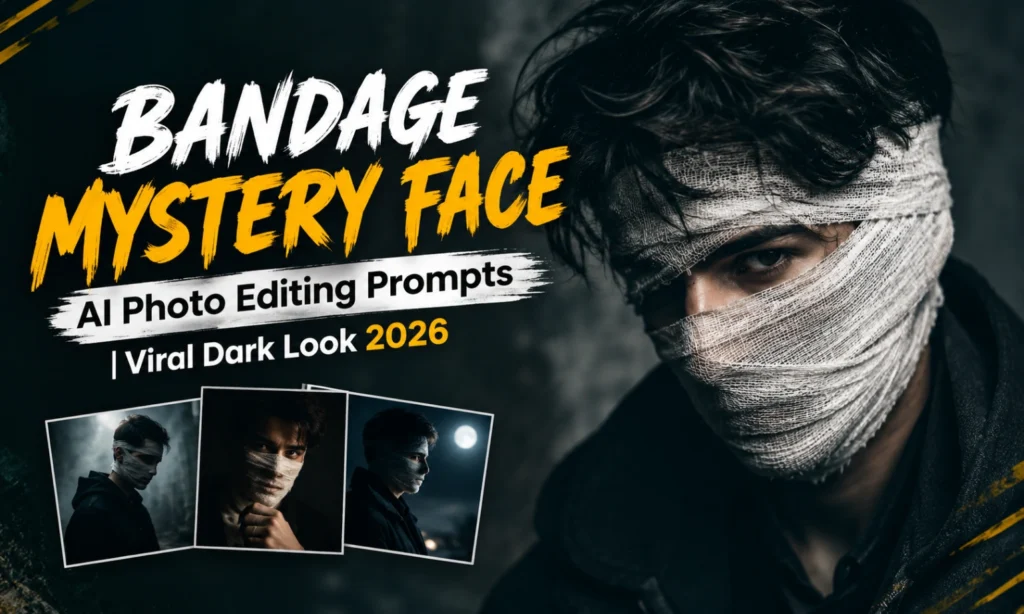
Have you ever wanted to create a photo that makes someone stop and wonder what happened? I tried this style with bandage details and found that covering part of the face can instantly give an ordinary portrait a mysterious, cinematic feel. The hidden facial details create curiosity without needing a complicated scene.
In this article, I’m sharing Bandage Mystery Face AI Photo Editing Prompts ideas for creating this dark and intriguing photo style. From partial face coverage to dramatic lighting, the focus is on keeping the edit realistic while adding a strong mystery element.
Why Bandage Mystery Face Edits Are Trending in 2026?
This editing style stands out because it creates curiosity with a very simple visual idea. A partially covered face, dark clothing, moody lighting, and a clean background can completely change the mood of a portrait.
I also noticed that this style works well for profile pictures and social media posts because the final image feels different from a regular portrait. The mysterious expression and hidden facial details give the photograph a cinematic character.
What Makes a Mystery Face Photo Look Good?
The bandage should look naturally wrapped around the face rather than appearing digitally pasted on. Small details such as fabric texture, folds, shadows, and skin contact make a major difference.
Lighting is equally important. A darker setup with focused light on the visible part of the face can create depth while keeping the photograph clear.
Bandage Mystery Face AI Photo Editing Prompts
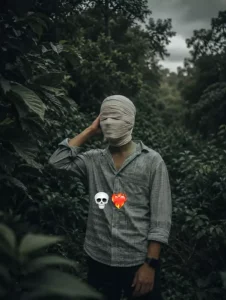
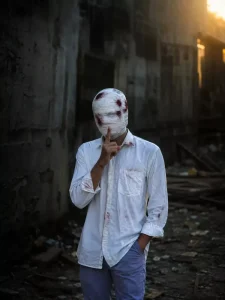
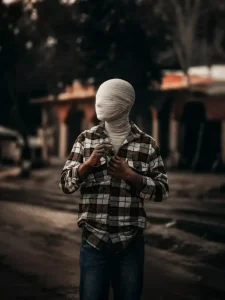
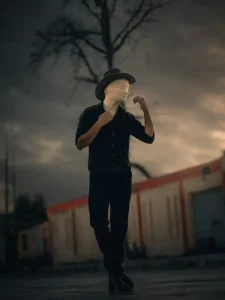
Half-Covered Face Editing
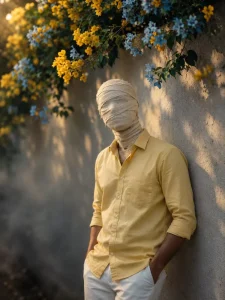
A half-covered face is one of the simplest ways to create this look. The bandage can cover one side while the other side remains visible, giving the portrait an unusual visual balance.
I prefer keeping the visible eye sharp and natural. A soft background blur can also help bring more attention to the uncovered part of the face.
Full Mystery Bandage Portrait
For a stronger effect, the bandage can cover most of the face while leaving only selected facial details visible. This creates a much more mysterious appearance.
The surrounding scene should remain simple in this type of edit. Dark clothing, a neutral wall, or a low-light environment can support the concept without distracting from the face.
Cinematic Bandage Photo Editing
A cinematic version can include dramatic shadows, low-key lighting, subtle haze, and a darker color grade. These elements can make the portrait feel inspired by a thriller or mystery movie.
I would avoid excessive smoke or artificial effects. The bandage and facial expression should remain the main visual focus.
Dark Background Mystery Edits
Changing the background is an easy way to strengthen the mood. A dark studio, abandoned-looking room, nighttime street, or minimal black backdrop can work well.
The background should not be completely lost in darkness. A little separation between the subject and surroundings helps maintain depth and makes the portrait look more professionally photographed.
Black Outfit With Bandage Face
A black outfit works naturally with this concept because it keeps attention around the face. A simple jacket, hoodie, shirt, or traditional dark outfit can all work depending on the original photograph.
I found that simpler clothing often produces a cleaner result. Too many patterns or accessories can compete with the bandage and weaken the mysterious effect.
Close-Up Bandage Face Portrait
A close-up crop can make the bandage details much more noticeable. It gives enough space to show the texture of the fabric, skin, eyes, and shadows around the covered area.
This style is especially suitable when the original photograph already has a strong facial expression. There is no need for a complicated background when the face itself fills most of the frame.
Bandage Mystery Face for Profile Pictures
This concept can also work for a striking profile picture. A close crop with one visible eye, controlled lighting, and a clean background can create a memorable display image.
For profile photos, I would keep the important facial details away from the edges. A centered composition usually works better when the image is displayed as a small circular or square thumbnail.
If you want more creative profile-picture styles, check out Instagram Viral Profile Picture AI Photo Editing Prompt 2026.
How to Keep the Bandage Realistic?
The biggest challenge is making the bandage blend naturally with the face. It should follow the shape of the head and create realistic shadows where it touches the skin.
I would also check the edges carefully after generating the image. If the fabric looks too smooth, perfectly flat, or disconnected from the face, the edit can immediately look artificial.
For sharper facial details and better image quality, you can also explore Normal to 4K Ultra HD Gemini Photo Editing Prompts.
Best Backgrounds for This Style
Different backgrounds can create completely different moods. Some options I would try include:
The best choice depends on the original photograph and the mood you want to create.
Common Mistakes to Avoid
A mystery edit can lose its impact when too many effects are added. I would watch for these common problems:
A clean edit usually looks stronger than one filled with unnecessary visual effects.
Final Thoughts
I enjoyed experimenting with the Bandage Mystery Face AI Photo Editing Prompts style because such a small change can give a portrait a completely different identity. The covered face naturally creates curiosity, while lighting and background choices help establish the mood.
If you are trying this concept, start with a clear portrait and build the edit around one strong idea. Keep the bandage realistic, preserve the visible facial details, and avoid adding effects simply to make the image look dramatic.