Viral Virat Kohli Signature Video Editing: How to Create the Trend In 2026
If you are a Virat Kohli fan, you have probably seen edits where his signature appears on a phone screen or the back of a smartphone. The effect looks simple, but the right placement and movement can make the video look much more realistic.
The good thing is that you can try this trend using your phone and a video editing app. You do not need advanced editing skills to get started. A short video, a signature-style graphic, and a few adjustments are enough to create your own version.
In this guide, you will learn how to create Viral Virat Kohli Signature Video Editing using apps such as CapCut or VN. We will also cover keyframes, motion tracking, effects, music, and a few related ideas for cricket fans.
What Is Viral Virat Kohli Signature Video Editing?
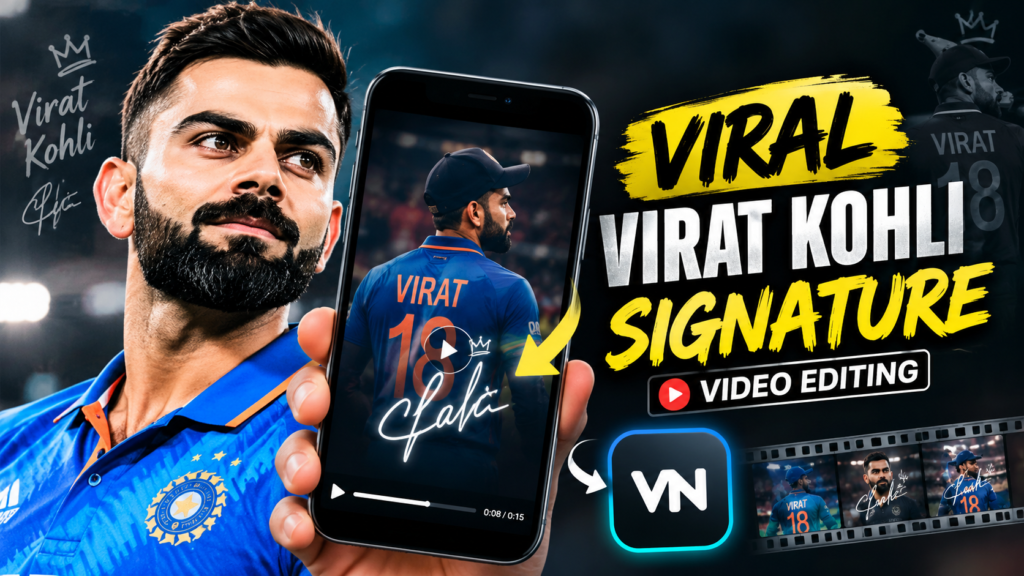
Virat Kohli signature video editing is a fan-made video trend in which a signature-style graphic is placed on a phone, screen, or another part of a video. The editor then makes the graphic move with the object so it looks like it belongs in the original footage. For a different creative style, Cinematic Background Portrait Prompts can help turn ordinary photos into dramatic portraits with movie-like lighting, depth, and atmosphere.
For example, you can record yourself holding a smartphone and add a signature graphic to its back. As you move the phone, the signature follows its position and angle.
This effect can work well for Instagram Reels, YouTube Shorts, and WhatsApp status videos. The key is to make the signature blend naturally instead of looking like a sticker floating over the video.
Keep in mind that a digitally added graphic is an editing effect. It should not be presented as proof of an authentic autograph or a personal endorsement by Virat Kohli.
What You Need to Make a Virat Kohli Signature Edit
Before starting, prepare these things:
- A smartphone with a camera
- A short video showing the phone clearly
- A signature-style graphic or transparent PNG
- CapCut, VN, or another editor that supports overlays and keyframes
- Optional background music and sound effects
For a beginner, a 5–8 second video is enough. Record in good lighting and avoid fast movements at first. A steady shot makes the signature easier to position.
How to Make a Viral Virat Kohli Signature Video
Step 1: Record Your Phone Video
Hold your phone so the back or screen is clearly visible, depending on where you want the signature to appear.
Record a short vertical clip. You can slowly tilt the phone or move it toward the camera to create a more interesting reveal.
Try not to move the phone too quickly. If the angle changes too much, tracking the signature will take more work.
Step 2: Open CapCut or VN
Open your preferred video editing app and create a new project.
Import the phone video and trim it to the part you want to use. For Instagram Reels and YouTube Shorts, a vertical 9:16 format is usually a good choice.
Make sure the phone remains visible throughout the main part of the clip.
Step 3: Add the Signature Overlay
Import your signature-style image as an overlay. A transparent PNG is useful because it allows the signature to appear without a solid background.
Resize it and place it on the phone. Adjust the position until it fits the visible surface.
Do not make the graphic too large. A smaller signature that follows the phone’s shape usually looks more natural than one that covers the whole device.
Step 4: Use Keyframes to Move the Signature
This is the most important part of the edit.
A keyframe tells the editor where an overlay should be at a particular moment. You can use multiple keyframes to make the signature follow the phone.
- Place the signature at the correct starting position.
- Add a keyframe at the beginning of the clip.
- Move forward on the timeline.
- Adjust the signature if the phone has moved.
- Repeat until the signature follows the phone through the video.
If your editor supports automatic motion tracking, you can try that feature instead. Manual keyframes are still useful when automatic tracking does not follow the phone correctly.
Step 5: Match the Phone’s Angle
If the phone tilts, the signature should tilt with it.
Use the available rotation, scale, and perspective controls to match the phone’s angle. If the phone moves closer to the camera, you may also need to increase the signature’s size slightly.
Take your time with this step. Even a small mismatch can make the effect look artificial.
Step 6: Blend the Signature Naturally
Now adjust the appearance of the signature.
- Reduce the opacity slightly if the graphic looks too strong.
- Match its brightness to the phone’s surface.
- Adjust the angle and size again if needed.
- Avoid excessive blur or glow.
- Check the result during movement, not just in a still frame.
The aim is to make the graphic look connected to the phone throughout the clip.
Step 7: Add Music and a Reveal Effect
Once the signature follows the phone correctly, you can add music or a short sound effect.
Try revealing the signature on a beat. A gentle zoom or a quick transition can also make the moment more noticeable.
Keep the effects simple. Too many flashes, shakes, and transitions can distract viewers from the main edit.
Step 8: Export the Final Video
Watch the complete video before exporting. Pay special attention to moments when the phone changes direction.
Export at a resolution supported by your original footage and editing app. If 1080p is available, it is usually a good choice for social media.
Save the finished video and check it once more before uploading.
Tips to Make Your Virat Kohli Signature Edit Look Better
A few small details can make a noticeable difference.
- Use a clear video: The phone should be easy to see, with enough light on its surface.
- Keep the signature in place: It should follow the phone instead of staying fixed on the screen.
- Match the perspective: Rotate and resize the graphic as the phone moves.
- Avoid too many effects: Clean editing often looks better than heavy filters.
- Keep the clip short: A quick reveal helps viewers understand the effect immediately.
- Check the edges: Make sure the signature does not float outside the phone’s boundaries.
If the effect looks wrong, fix the tracking and positioning first. Adding more filters will not solve a signature that moves incorrectly.
Virat Kohli Signature Shoes, Photo and Live Wallpaper
Some people also search for Virat Kohli signature shoes, Virat Kohli photo, HD wallpaper, and live wallpaper. These are related fan interests, but they are different from the signature-on-phone video trend. Similarly, movie fans can try a Jailer 2 Movie Poster AI Photo Editing Prompt to create a cinematic poster-style edit inspired by the upcoming film.
Virat Kohli signature shoes: If you are looking for shoes associated with Virat Kohli, check the exact product name and official product details. A signature-themed edit does not confirm that a shoe is an official product.
Virat Kohli photo and HD wallpaper: You can create a cricket-themed edit using a suitable photo and a background featuring stadium lights, a cricket ground, or your favorite team colors. Use images you have permission to use when publishing content.
Virat Kohli live wallpaper: A live wallpaper is an animated background for a phone or computer. You can turn a short fan edit into a video wallpaper if your device and wallpaper app support that format.
Rohit Sharma signature and MS Dhoni signature: Fans may search for similar edits featuring other cricketers. You can follow the same basic editing process with a different signature-style graphic, while clearly treating the result as a fan edit.
More Cricket Video Editing Ideas
Once you understand overlays and keyframes, you can experiment with other cricket edits.
- Create a cinematic Virat Kohli player intro.
- Make a slow-motion batting or celebration edit.
- Add a stadium background to a cricket photo.
- Create an HD cricket wallpaper or a short animated wallpaper.
- Sync cricket highlights with music and transitions.
You can also explore these IPL edit ideas for stylish cricket Reels and status videos for more inspiration.
Final Thoughts
The Viral Virat Kohli Signature Video Editing trend is a fun way to create a cricket-themed Reel with a simple phone video. You do not need complicated effects to get a good result. Focus on placing the signature correctly, matching the phone’s movement, and keeping the final edit clean.
Start with a short clip and practice using keyframes. Once the signature follows the phone naturally, you can add music, a reveal effect, and your own creative style.