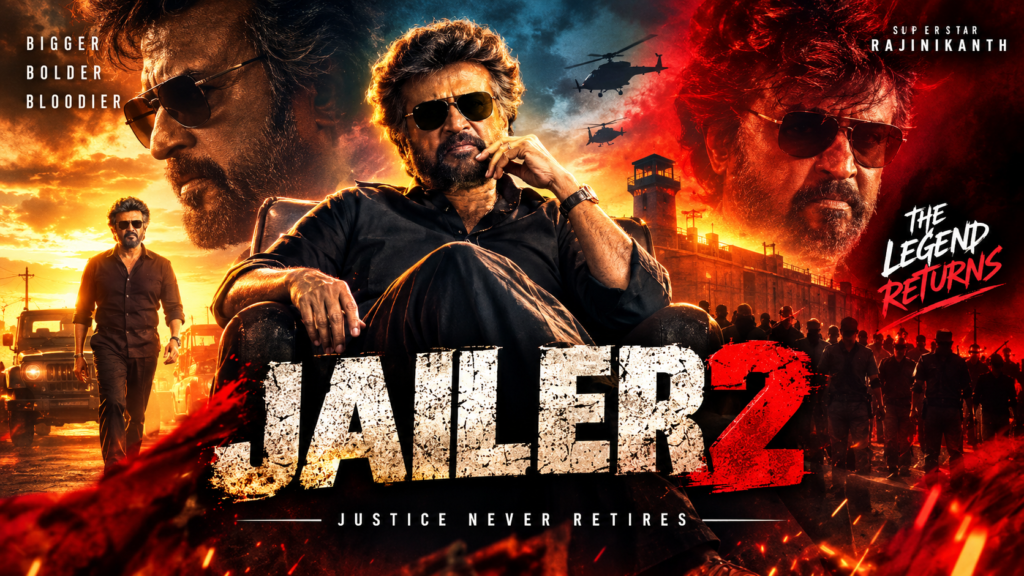
Jailer 2 Movie Poster AI Photo Editing Prompt: Copy and Create Cinematic Photos
Have you seen those photos where someone stands outside a cinema hall with a giant movie poster behind them? The lighting looks dramatic, the outfit is stylish, and the whole picture feels like a scene from an action movie. You can create a similar look with a Jailer 2 Movie Poster AI Photo Editing Prompt and your own photo.
You do not need a professional camera or advanced editing skills. Just upload a clear photo to a compatible AI image editor, copy a prompt, and describe the background, outfit, pose, and lighting you want. You can create a solo portrait, a girl photo edit, a couple image, or a rainy-night cinema scene.
In this guide, you will find ready-to-copy Jailer 2 AI prompts for different styles, along with simple steps and tips to make your final image look natural.
What Is Jailer 2 Movie Poster AI Photo Editing?
Jailer 2 movie poster AI photo editing is a creative way to turn an ordinary photo into a cinematic, movie-poster-style image. The idea is to place yourself in a dramatic cinema setting with a large JAILER 2 fan-made poster, stylish clothing, and action-film lighting.
You can use an AI prompt to describe details such as:
- A large illuminated JAILER 2 poster in the background
- A realistic Indian cinema hall at night
- Black outfits with red-and-gold lighting
- Natural facial features and realistic skin texture
- Smoke effects, reflections, and dramatic shadows
- Full-body or portrait framing for social media
The final result depends on the AI tool and the quality of your reference photo. These prompts are intended for fan-made creative edits, not official movie promotions.
Best Jailer 2 Movie Poster AI Photo Editing Prompts
Below are five prompts you can copy and try with a compatible image editor, such as ChatGPT or Gemini. Upload your photo first, then paste the prompt that matches the look you want.
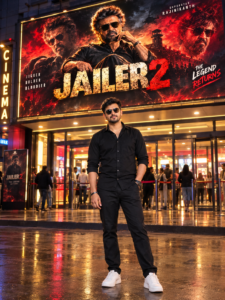
Jailer 2 Movie Poster Prompt for Boys
Use this prompt if you want a stylish solo photo outside a cinema hall, with a dramatic poster behind you.
▲ Show / Hide Prompt
Jailer 2 AI Photo Editing Prompt for Girls
If you want a dramatic movie-night photo with a stylish black outfit, this prompt is a good starting point.
▲ Show / Hide Prompt

Jailer 2 Couple Photo Editing Prompt
Want to create a couple photo with a movie-poster background? Upload a picture showing both people clearly and use this prompt.
▲ Show / Hide Prompt

How to Create a Jailer 2 Movie Poster AI Photo Edit
You can create your image in a few simple steps. The exact options depend on the AI tool you use.
Step 1: Choose a Clear Photo
Use a photo where your face is easy to see. A front-facing or slightly angled image with good lighting usually gives the AI a clearer reference.
Avoid heavily filtered selfies, blurry pictures, or photos where your face is hidden behind sunglasses.
Step 2: Open an AI Image Editor
Open a compatible image editor that supports photo uploads and image editing. ChatGPT, Gemini, and dedicated AI image tools may offer suitable options depending on their current features and access.
Step 3: Upload Your Photo
Upload the image you want to edit. If you are making a couple photo, choose an image where both people are visible.
Step 4: Copy and Paste the Prompt
Choose one of the Jailer 2 movie poster AI photo editing prompts above and paste it into the editor. You can change the outfit, pose, background, or lighting to match your personal style.
Step 5: Generate and Review the Result
Check whether the face looks natural and the poster is visible. Pay attention to hands, feet, clothing, lighting, and background details.
If something looks wrong, ask the AI to correct that specific part instead of rewriting the entire prompt.
Step 6: Save Your Final Image
Once you are happy with the result, save the image using the options available in your editing tool. You can then crop it for Instagram, Facebook, WhatsApp, or another platform.
How to Make Your Jailer 2 AI Poster Look Realistic
A long prompt does not always produce a better image. Clear instructions about identity, composition, and lighting often make a bigger difference. The same approach can help when using an Instagram Trending Money Template, where choosing the right photos and keeping the edits simple can create a more appealing result.
Keep Your Original Face
Tell the AI to use your uploaded photo as the main identity reference. Ask it to preserve your facial structure, skin tone, hairstyle, and natural expression.
This can help maintain your appearance, although no prompt can guarantee a perfect match.
Match the Lighting
If your face is brightly lit but the background is dark, the image may look artificial. Ask for the light on your face and clothing to match the cinema entrance.
Red-and-gold highlights can create a cinematic look without making the skin appear orange or overly bright.
Keep the Background Simple
A large poster, cinema entrance, and a few background lights are usually enough. Adding too many crowds, smoke effects, sparks, and neon signs can distract from the main subject.
Choose one main visual style and build the image around it.
Check the Poster Text
AI image tools sometimes produce misspelled words or distorted lettering. If the JAILER 2 title looks incorrect, ask the tool to leave a clean space for the title. You can then add the wording manually using an image editor.
Choose the Right Image Size
Use a suitable aspect ratio for where you plan to share the image:
- Instagram post: 4:5
- Instagram Story or Reel cover: 9:16
- YouTube thumbnail: 16:9
- Vertical poster design: 2:3 or another supported portrait ratio
If your tool offers 3:4 framing, that can also work well for a full-body cinema portrait.
Common Problems With Jailer 2 AI Photo Editing
The AI changes your face: Upload a clearer reference photo and repeat the instructions to preserve your identity.
The hands look strange: Ask the tool to keep both hands in a simple, natural position. Pockets or relaxed arms can be easier to render.
The JAILER 2 title is misspelled: Generate the background without text and add the title separately.
The person looks pasted onto the background: Ask for matching light direction, realistic contact shadows, and correct perspective.
The image looks too artificial: Reduce extra effects and request natural skin texture, realistic clothing, and balanced lighting.
The poster covers your face: Specify that the person must remain in the foreground and the poster must stay visible behind them.
Final Thoughts
The Jailer 2 Movie Poster AI Photo Editing Prompt is a fun way to give an ordinary photo a cinematic look. You can try a stylish solo portrait, a couple edit, a rainy-night scene, or a lively cinema celebration without manually building every part of the background.
Start with a clear photo, choose a prompt that fits your idea, and make small changes if the first result does not look right. When using Toxic Movie AI Photo Editing Prompts, focus on preserving your original face, adding natural lighting, and keeping the composition clean. These details can make your fan-made movie poster look much more convincing.